08 Mar, 2026
.jpg)
Larapress has always aimed to simplify content management for developers, bloggers, and website managers. The latest updates introduce a series of powerful features that make editing files, managing posts, and creating new content easier than ever. Whether you are a beginner or an experienced user, these enhancements allow you to work efficiently, reduce repetitive tasks, and structure content dynamically.
Edit Public and Views Folders Directly
One of the most significant improvements is the ability to edit files in the public and views folders directly from the Larapress interface. Traditionally, modifying these files required logging into a server, using FTP, or accessing a code editor externally. Now, Larapress provides an integrated file management system where you can view all the folders, select files, and make edits in real-time.
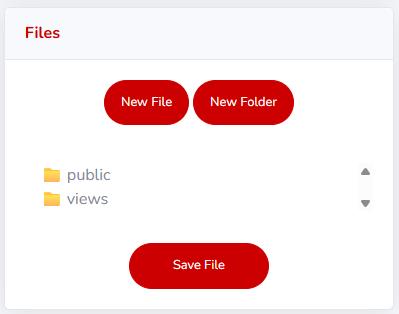
For example, the public folder, which contains CSS, JavaScript, and media assets, can now be updated directly to change the appearance or behavior of your site. Similarly, the views folder, which holds templates for your pages and posts, is editable without leaving Larapress. This streamlines the workflow, allowing content managers and developers to implement updates immediately.
The interface for this feature is intuitive. You can create a New File or New Folder, save changes, and organize assets in a hierarchical structure. The scrolling folder view ensures even large projects remain manageable, and you can quickly locate files without searching through the server manually.
Add a Block Editor for Flexible Content
Content creation in Larapress has become more dynamic with the introduction of the block editor. Unlike traditional text editors, the block editor allows users to add multiple types of content blocks, such as paragraphs, images, videos, quotes, code snippets, and more. Each block is independent, which means you can rearrange, duplicate, or remove blocks without affecting other content.
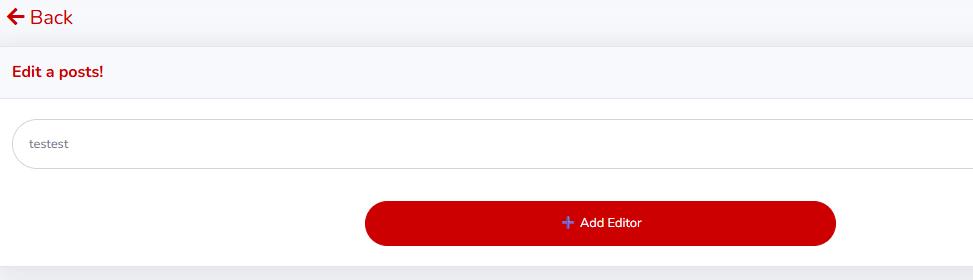
This feature is especially useful for creating complex layouts or content-rich posts. For instance, you can start a post with an introductory paragraph, insert an image, follow with a text block explaining the image, and then add a call-to-action block—all without switching between different editors or pages.
Adding a new block is straightforward: simply click Add Editor in the post editor interface, and a new block appears where you can input content. Each block is fully editable, and changes are saved automatically when you hit Save File, reducing the risk of losing work.
Efficient Post Management: All Posts and Bulk Actions
Larapress has redesigned the All Posts interface to make managing multiple posts faster and easier. Users can now select posts and perform bulk actions with a single click. These actions include Delete, Publish, Unpublish, Change Type, and Duplicate, covering all essential post management needs.
The Duplicate feature is particularly powerful. It allows you to replicate an existing post, including all its content blocks, metadata, and settings. This is ideal for recurring content, such as weekly updates, event announcements, or tutorials, where the structure remains similar. Instead of creating a post from scratch each time, you can duplicate a template and update only the necessary details.
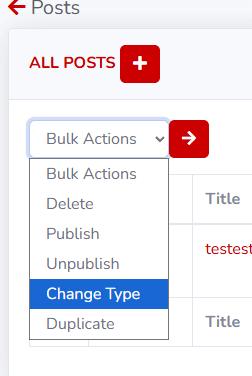
Changing the post type is now just as simple. With the Change Type option, you can reclassify posts under different categories or post types without manually editing each post. This feature is invaluable for websites with multiple content types, such as blogs, tutorials, portfolios, or news articles.
Create New Post Types Easily
Creating a new post type in Larapress has been streamlined to accommodate diverse content needs. Users can now click New Post, enter a title, and assign a post type. With support for multiple post types, you can manage different kinds of content separately while maintaining consistency across your website.
For example, a tutorial website may have post types like Articles, How-To Guides, Video Tutorials, and Case Studies. Each post type can have custom layouts, content blocks, and templates. This ensures that every post is displayed optimally without requiring manual adjustments for each type.
The block editor integrates seamlessly with new post types. When you create a post, you can add multiple blocks immediately, giving you full control over the structure and appearance of your content. Whether it’s a text-heavy article or a multimedia-rich tutorial, Larapress provides the flexibility to handle it.
Streamlined Workflow and Automation
These combined features significantly improve workflow efficiency. Editing templates and public files directly, creating posts with multiple blocks, duplicating content, and managing post types reduces repetitive tasks. For teams working collaboratively, this means less time spent coordinating edits and more time creating high-quality content.
Moreover, automated saving ensures that changes in the editor or file management system are stored in real-time. This reduces the risk of losing work due to accidental navigation or system errors. The user-friendly interface, with clearly labeled buttons like Save File, Add Editor, and bulk action controls, makes the platform intuitive even for new users.
Why These Features Matter
In today’s fast-paced content environment, website owners need tools that support quick edits, flexible content creation, and efficient post management. Larapress delivers these capabilities while maintaining simplicity and accessibility.
Direct file editing saves time by removing the need for external code editors.
Block editor enables rich content layouts without coding knowledge.
Bulk actions and duplicate features streamline repetitive tasks, making content management faster.
Custom post types allow you to organize content logically and display it effectively.
Together, these features empower users to produce, manage, and publish content with greater confidence and speed. Larapress continues to evolve, ensuring that developers and content creators have the right tools to manage their websites efficiently.
Conclusion
The new post creation and management features in Larapress mark a significant step forward in content management systems. By combining file editing, a versatile block editor, bulk actions, and post type management, Larapress provides a complete solution for modern content workflows. Users can focus on creating high-quality content, knowing that the platform handles structure, organization, and duplication efficiently.
Whether you are managing a blog, a portfolio, or a complex website with multiple content types, Larapress offers the tools necessary to enhance productivity, improve content quality, and reduce repetitive tasks. Explore these features today and experience a faster, smarter, and more efficient content management workflow.